Need Help Setting Up OpenClaw? We Deploy, Configure, and Extend It for You.
DeepSpeed AI helps founders, teams, and enterprises install OpenClaw, connect messaging channels, configure models, secure self-hosted deployments, and build custom skills around real workflows.
OpenClaw Setup Services
If you want OpenClaw running correctly without spending days wiring channels, models, security, and automations together, this is the service.
Installation & Configuration
We install OpenClaw, configure the onboard flow, set up the daemon runtime, connect your preferred models, and verify the assistant is actually usable day one.
Self-Hosted & Secure Deployment
We help teams that need local-first OpenClaw deployments, controlled model routing, messaging approval boundaries, and a setup that fits internal security expectations.
Custom Skills & Integrations
We extend OpenClaw with bespoke skills, internal API connections, browser automation, and workflow-specific logic so it is more than a generic personal assistant install.
OpenClaw Integration Capabilities
The practical capabilities we configure when clients hire us to deploy OpenClaw well.
Omni-Channel Messaging Gateway
OpenClaw connects to 14+ messaging platforms through a unified gateway architecture. Your AI assistant responds across WhatsApp, Telegram, Slack, Discord, iMessage, Signal, Microsoft Teams, and more—all from a single local instance.
- WhatsApp via Baileys protocol
- Telegram using grammY framework
- Slack integration with Bolt SDK
- Discord.js native support
- iMessage via BlueBubbles bridge
- Microsoft Teams, Matrix, Signal, Zalo & WebChat
Model-Agnostic AI Backend
OpenClaw works with 12+ AI model providers—use Claude, GPT, Gemini, Grok, or run completely air-gapped with local models via Ollama or LM Studio. Your keys, your choice, your data sovereignty.
- Anthropic Claude (all versions)
- OpenAI GPT-4o, GPT-4 Turbo
- Google Gemini & DeepSeek
- xAI Grok & Mistral
- Local models via Ollama/LM Studio
- OpenRouter & Vercel AI Gateway
Voice & Browser Automation
OpenClaw includes built-in voice integration with ElevenLabs, always-on speech recognition (Voice Wake), and dedicated browser control for web automation, research, and form filling.
- Voice Wake for always-on listening
- Talk Mode for continuous conversation
- ElevenLabs voice synthesis
- Chrome/Chromium browser control
- Web page snapshots & actions
- Canvas visual workspace (A2UI framework)
Local-First Gateway Architecture
OpenClaw runs entirely on your own devices with a WebSocket control plane. Install via npm, configure with the onboard wizard, and run as a system daemon (launchd/systemd) for always-on availability.
- Node.js 22+ runtime (cross-platform)
- WebSocket control plane (ws://127.0.0.1:18789)
- System daemon installation (launchd/systemd)
- Multi-agent routing with isolated workspaces
- Pairing mode security for unknown senders
- Mobile companion apps (iOS/Android)
Operational Efficiency
Measurable impact of deploying autonomous agents
Engineering Time Saved
Response Time
Operational Cost
Works Where You Work
Seamless integration with your existing toolstack
- Personal chats
- Group messaging
- Media sharing
Telegram
- Bot API
- Channels
- Group management
Slack
- Workspaces
- Channels
- Thread replies
Discord
- Servers
- DMs
- Voice channels
iMessage
- BlueBubbles bridge
- SMS fallback
- Reactions
Signal
- E2E encryption
- Disappearing messages
- Groups
Microsoft Teams
- Channels
- Direct messages
- Meetings
Matrix
- Federated chat
- E2E rooms
- Bridges
Notion
- Pages
- Databases
- Automation
Obsidian
- Vault access
- Note creation
- Linking
GitHub
- PRs
- Issues
- Actions
Trello
- Boards
- Cards
- Automation
Spotify
- Playback control
- Playlists
- Search
Home Assistant
- Device control
- Automations
- Scenes
Philips Hue
- Lights
- Scenes
- Schedules
Browser Control
- Web research
- Screenshots
- Form filling
Gmail
- Pub/Sub integration
- Drafts
- Send
Webhooks & Cron
- Scheduled tasks
- Event triggers
- APIs
Need OpenClaw installation help or a custom integration? We build bespoke skills for internal tools.
Request Custom IntegrationReal-World Applications
How enterprises are deploying OpenClaw agents today
Unified Communications: One AI Across All Platforms
Challenge
A distributed engineering team used Slack for work, Discord for open-source community, WhatsApp for quick pings, and Telegram for contractors. Context was fragmented and no single assistant worked everywhere.
Solution
Deployed OpenClaw with 5 messaging channels configured. The same AI assistant now responds across all platforms, maintaining persistent memory and context. Engineers message from wherever they are—the assistant remembers their projects, preferences, and ongoing tasks.
Results
"I message from WhatsApp at 2am and it remembers the Slack thread from Tuesday. That's magic." — Engineering Lead, Remote-First Startup
Smart Home: Voice-Controlled Personal Assistant
Challenge
A tech enthusiast wanted a unified smart home controller that worked across Philips Hue, Home Assistant, Spotify, and could be triggered via voice or any messaging app—without relying on Amazon or Google cloud services.
Solution
Configured OpenClaw with Home Assistant, Hue, and Spotify integrations. Enabled Voice Wake for hands-free activation and connected iMessage + Telegram for remote control. All processing stays local with a self-hosted Ollama model.
Results
"Finally a smart home that doesn't phone home. I control everything from my watch via iMessage." — Software Architect, Privacy Advocate
Executive Operations: Private AI Chief of Staff
Challenge
A VC partner needed 24/7 assistance with email triage, calendar management, web research for due diligence, and document organization—but couldn't risk confidential deal information leaving their laptop.
Solution
Deployed OpenClaw locally with Gmail Pub/Sub integration, browser automation for research, and Notion sync for deal tracking. All queries routed through Claude API with strict data handling policies. The partner interacts via iMessage and Signal for maximum convenience.
Results
"My assistant reads term sheets and does company research without any cloud storage risk." — Managing Partner, Venture Capital Firm
Sales Prospecting: Autonomous Lead Generation Agent
Challenge
A boutique AI consultancy spent 15+ hours weekly on manual prospecting—scanning directories, researching companies, finding contacts, and drafting personalized outreach. The founder needed to focus on delivery, not pipeline building.
Solution
Configured OpenClaw with browser automation to scan ProductHunt, IndieHackers, and industry directories daily. The agent visits each company website, analyzes their tech stack and pain points, enriches contact data via Apollo API, and drafts personalized outreach. All leads are logged to Notion with research notes, and a Slack summary is sent each morning.
Results
"I wake up to a Slack message with 20 qualified leads and draft emails ready to review. It's like having an SDR that never sleeps." — Founder, AI Services Agency
OpenClaw Enterprise Implementation
OpenClaw enterprise implementation is a different engagement than a personal install: governance, security review, and fleet rollout come first. This is how we run it.
Governed Rollout & Access Control
Role-based access, approval boundaries on high-risk actions, and prompt/audit logging so security teams can sign off on an OpenClaw enterprise implementation before it touches production channels.
Self-Hosted, VPC & Air-Gapped Deployment
We design OpenClaw deployments for your security posture — self-hosted on your hardware, inside your VPC, or fully air-gapped with local models via Ollama. Data residency stays under your control.
Fleet Deployment for Teams
Rolling OpenClaw out to 10, 50, or 500 operators is a different problem than one install. We handle model routing, per-seat cost controls, shared skill libraries, and centralized configuration management.
Compliance & Security Review Support
Deployment architecture documents, data-flow diagrams, and control mappings your compliance team can take into SOC 2, HIPAA, or internal security review — so legal greenlights the rollout instead of blocking it.
OpenClaw Installation & Deployment Roadmap
From first install to production-ready OpenClaw setup, support, and extension.
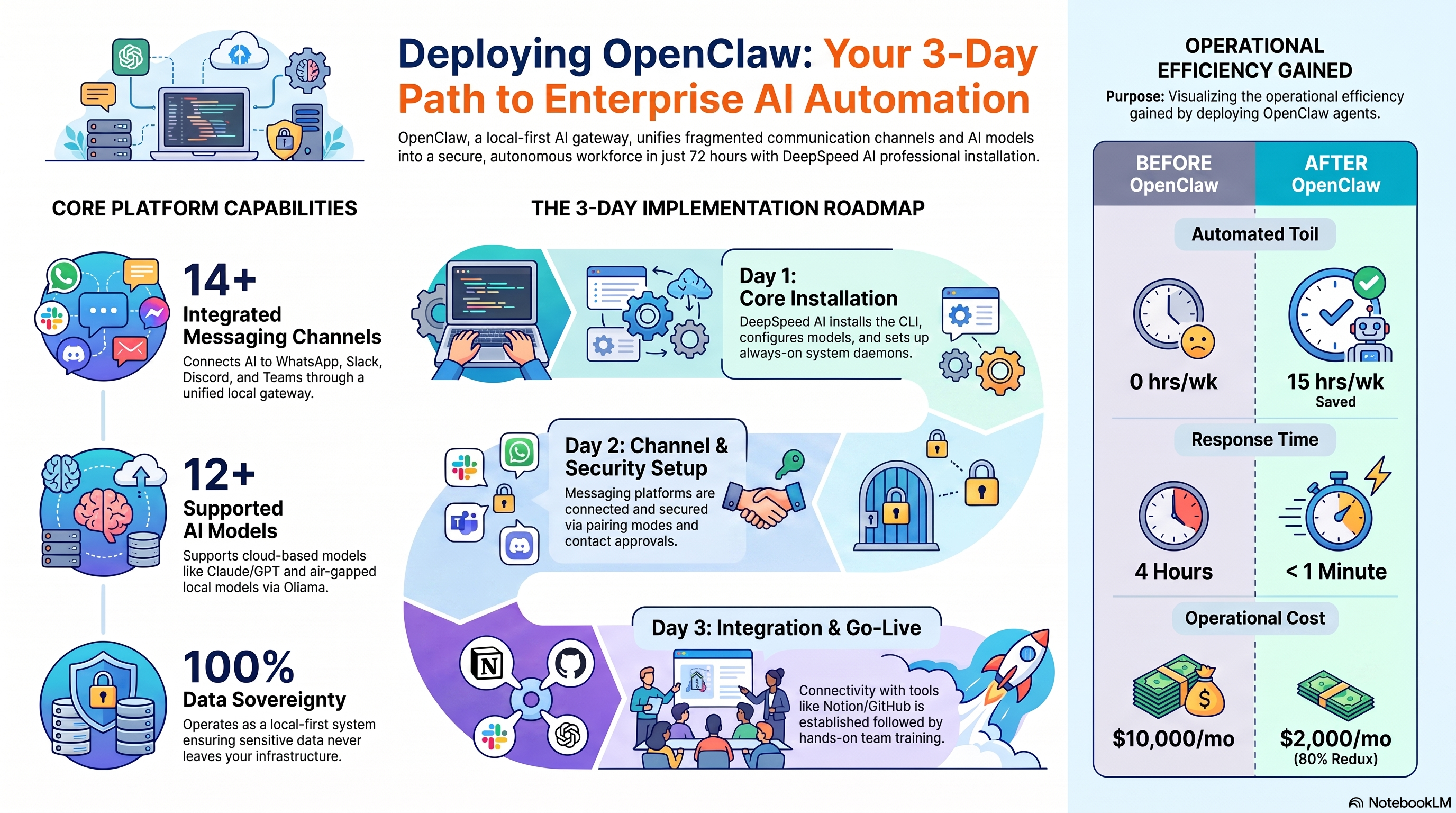
Core Installation
- Install OpenClaw CLI and run onboard wizard
- Configure AI model (Claude, GPT, or Ollama)
- Set up system daemon for always-on availability
- Verify gateway and dashboard access
Channel Setup
- Connect your messaging platforms (WhatsApp, Slack, Discord, etc.)
- Configure pairing security and contact approvals
- Test message routing across all channels
- Optional: Enable voice features (Voice Wake, Talk Mode)
Go Live & Training
- Connect productivity tools (Notion, GitHub, Gmail)
- Hands-on training session with your team
- Documentation and troubleshooting guide handoff
- Go live with production use
Custom Development
- Build custom skills for internal APIs
- Configure cron jobs and webhook automations
- Database integrations and advanced workflows
- Ongoing support and optimization
Frequently Asked Questions
Common questions about OpenClaw setup, consulting, self-hosting, and implementation help.
Ready to Deploy Your AI Workforce?
Start automating complex workflows today with secure, autonomous OpenClaw agents.